How To Use Revolution Slider

The short tutorial below shows how to use the popular SliderRevolution (A.K.A Revolution Slider) slider plugin. If you have this slider already installed or are thinking about installing a slider this post will be helpful for you. Watch the video below and leave your questions in the comments or contact us.

Purchase Revolution Slider: http://codecanyon.net/item/slider-revolution-responsive-wordpress-plugin/2751380

How to add a category in WordPress


Adding categories in WordPress is a common action that you will take as a site maintainer. It is a straightforward process to add new categories. By default WordPress has one category, uncategorized. You will need to make sure that you assign any “uncategorized” content to other categories that will be beneficial to your users. Let’s get started.

StepĀ 1


Click on Categories located under “Posts” in the sidebar navigation. See Below.
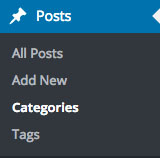
Wordpress Category Link

Step 2


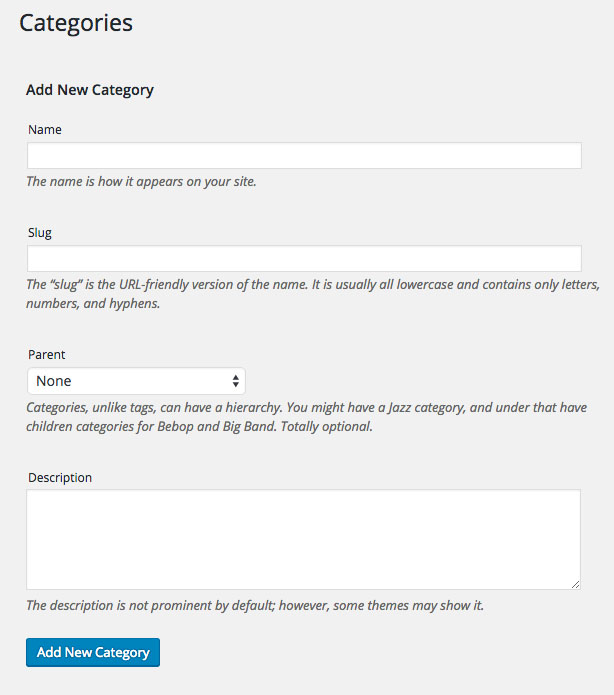
Fill in the fields in the form on the Categories page.
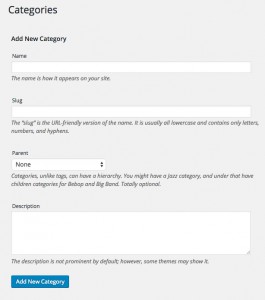
Wordpress Category Form

Step 3


If your category does not have a parent category click “Add New Category” as seen above. If your category is part of a another category such as “Books”, “News”, “Coupons”, etc… You can select the parent category in the “Parent” dropdown list seen below.

Step 4


Check your category list to confirm that your category was add in the proper relationship.

Categorizing your content can be very helpful for users trying to navigate your website. You can guide through your content using these simple tools. Share this with your friends who may have the same questions that you have.

Thanks!
Adding Audio To WordPress Using Amazon S3

This tutorial shows how to add audio that you produce or rip from a cd (Instructions on Ripping a CD on Windows). Once you have your audio file you can easily upload it to AWS (Amazon Web Services) to be used for delivery on your Wordpress website.


This tutorial (No audio) shows how to add audio that you produce or rip from a cd (Instructions on Ripping a CD on Windows). Once you have your audio file you can easily upload it to AWS (Amazon Web Services) to be used for delivery on your WordPress website. This tutorial uses the JW Player plugin to add the video to the post. Enjoy the video and leave any questions or comments below.

Boost Your WordPress Videos Using Cloud Technologies

Learn how to Boost Your WordPress Videos Using Cloud Technologies.

Watch the video above to learn how to use AWS (Amazon Web Services) with JW Player to boost your WordPress videos. Topics covered will include:

  • AWS S3 Setup/Use
    AWS CloudFront Distribution Setup/Use
    AWS Elastic Transcoder Setup/Use
    How to install the JW Player plugin
    Using the JW Player plugin in your posts

What is a CMS?

What is a Content Management System

What is a CMS (Content Management System)?

A CMS also known as a Content Management System is a piece of computer software that runs on a web server and allows content editors to manage their website content. A content editor is anyone who will make changes on a website whether it’s the secretary or the owner of a company. There are different types of CMSs for different uses IMHO (In my humble opinion) although some designers and developers have one CMS that they feel is good for all of their projects. This is often related to the size and complexity of the project. Some of the best CMSs are WordPress, Joomla, Drupal, Expression Engine, and Text Pattern. Alpha Omega Design has used WordPress, Drupal, and Joomla in past projects but, we almost exclusively use WordPress now as it is able to handle very large and complex projects.

So, what is it? A CMS gives the content editor an easy to use interface for editing content often without any need to know HTML, CSS, or JavaScript. Although you don’t necessarily need it I recommend that content editors have a basic understanding of at least HTML. You may hear someone say “Does your website have a WYSIWYG (Pronounced wisiwig) editor?” WYSIWYG editors are a common part of all CMSs and this is the area where you add text, images, and videos. If you have used Microsoft Word you can likely use a WSIWYG editor in one of the CMSs mentioned here. In addition to giving the editors an easy interface to use, the CMS also provides the designers and developers a more efficient way to mange the websites design and development. The CMS will often allow parts of the website to be duplicated with one management point. This helps the site maintain more consistent design and features. There is a lot more that CMSs do but I have covered the most important here to give you a more informed decision making process.


I hope this is helpful for your ministry, non-profit, or business. Thanks and God Bless!